In 2026, the fintech landscape is shifting from speculation to production. For hosting providers, VPN services, and digital agencies using WHMCS, the question is no longer if you should accept cryptocurrency, but how efficiently you can do it. With stablecoins becoming the "Internet’s dollar" for cross-border flows, integrating a robust payment gateway is essential for maintaining a competitive edge in the EU and global markets.
One of the most seamless ways to bridge the gap between traditional billing and the crypto economy is through the INXY Payment Gateway. This guide provides a detailed walkthrough for setting up the INXY module on your WHMCS platform.
1. Why Crypto for WHMCS in 2026?
Integrating crypto payments into your billing system offers several strategic advantages:
Lower Fees: Traditional processors often charge 2–4% for international payments, while gateways like INXY provide more cost-effective alternatives.
Chargeback Protection: Blockchain transactions are immutable; once confirmed, they cannot be reversed by the sender, eliminating the administrative burden of fraudulent chargebacks.
Global Reach: Crypto allows you to accept payments from customers in regions with restrictive banking or unstable local currencies without multi-day delays.
2. System Requirements
Before installation, ensure your environment meets the following criteria for the INXY module (Version 1.0.3):
Location: Go to Merchant settings → API in the INXY dashboard and paste the URL.
5. Advanced Matching and Underpayment Rules
Crypto transactions can sometimes result in minor amount differences due to network fees. INXY handles this through the config.php file:
Amount Deviation: By default, the module accepts payments within 1% of the requested amount. For WHMCS, it is recommended to set 'amount_deviation_percentage' = 49 to reduce unnecessary top-up attempts and align with WHMCS's partial payment flow.
Time Window: Payments must arrive within 2 hours in production (30 minutes in Sandbox) to be automatically matched.
6. Summary of Payment Outcomes
Status
Customer Experience
WHMCS Admin Status
Paid in Full
Invoice shows "Paid".
Order marked as paid.
Overpaid
Extra amount added as credit.
Visible credit in account.
Partially Paid
"Awaiting payment" status.
Balance reduced by amount received.
Expired
"Expired" status on page.
Order remains unpaid.
By implementing INXY, you provide your users with a modern, 24/7 payment rail that settles in seconds, ensuring your hosting or digital business stays ahead of the curve in 2026.
Would you like me to draft a series of social media posts to announce your new crypto payment options to your customers?
Annual vs. Monthly SaaS Billing: Why Upfront Crypto Payments Win on Cash Flow
For most SaaS companies, monthly billing is the unexamined default. It lowers the barrier to entry, so it feels like the safe choice. But for B2B and high-ticket software, that default quietly works against you: it spreads revenue thin, exposes every renewal to a payment failure, and hands a chunk of your SaaS billing and payments flow to card networks that were never built for recurring, cross-border charges.
For most SaaS companies, monthly billing is the unexamined default. It lowers the barrier to entry, so it feels like the safe choice. But for B2B and high-ticket software, that default quietly works against you: it spreads revenue thin, exposes every renewal to a payment failure, and hands a chunk of your SaaS billing and payments flow to card networks that were never built for recurring, cross-border charges.
There is a structurally better model for B2B: annual upfront billing settled in crypto. Paid in stablecoins, an annual plan lands the full year of revenue immediately, removes eleven future points of failure, and eliminates chargebacks entirely. This article makes the cash-flow and retention case for upfront annual billing, and shows how stablecoin payments make it easy to offer.
The Hidden Cost of Monthly Card Subscriptions
A monthly subscription is not one payment — it is twelve chances per customer, per year, for something to go wrong. Card-based SaaS payment processing carries failure rates that compound across a subscriber base:
Involuntary churn — customers lost to failed payments rather than active cancellation — accounts for 20–40% of total churn, and up to 48% in higher-risk sectors.
Left unmanaged, failed payments can quietly consume up to 9% of total revenue.
Expired cards alone cause roughly 42% of failed subscription payments; the customer never chose to leave, the card simply lapsed.
Cross-border recurring charges are frequently flagged or declined by issuing banks, and chargebacks on digital goods drain revenue plus dispute fees.
Each monthly cycle re-exposes you to all of this. Annual billing collapses twelve renewal events into one — shrinking the failure surface by an order of magnitude — and, just as importantly, pulls a full year of cash forward instead of metering it out month by month.
Why Annual Upfront Billing Changes the Math
Upfront annual plans are not just an accounting convenience; they change the unit economics of the business. The advantage is sharpest when the customer actually prefers to pay this way — and crypto buyers do.
Cash flow now, not later. Collecting twelve months upfront strengthens working capital and reduces dependence on outside funding to finance growth.
A smaller churn surface. One payment per year means one renewal decision per year — and far fewer involuntary drop-offs from card failures.
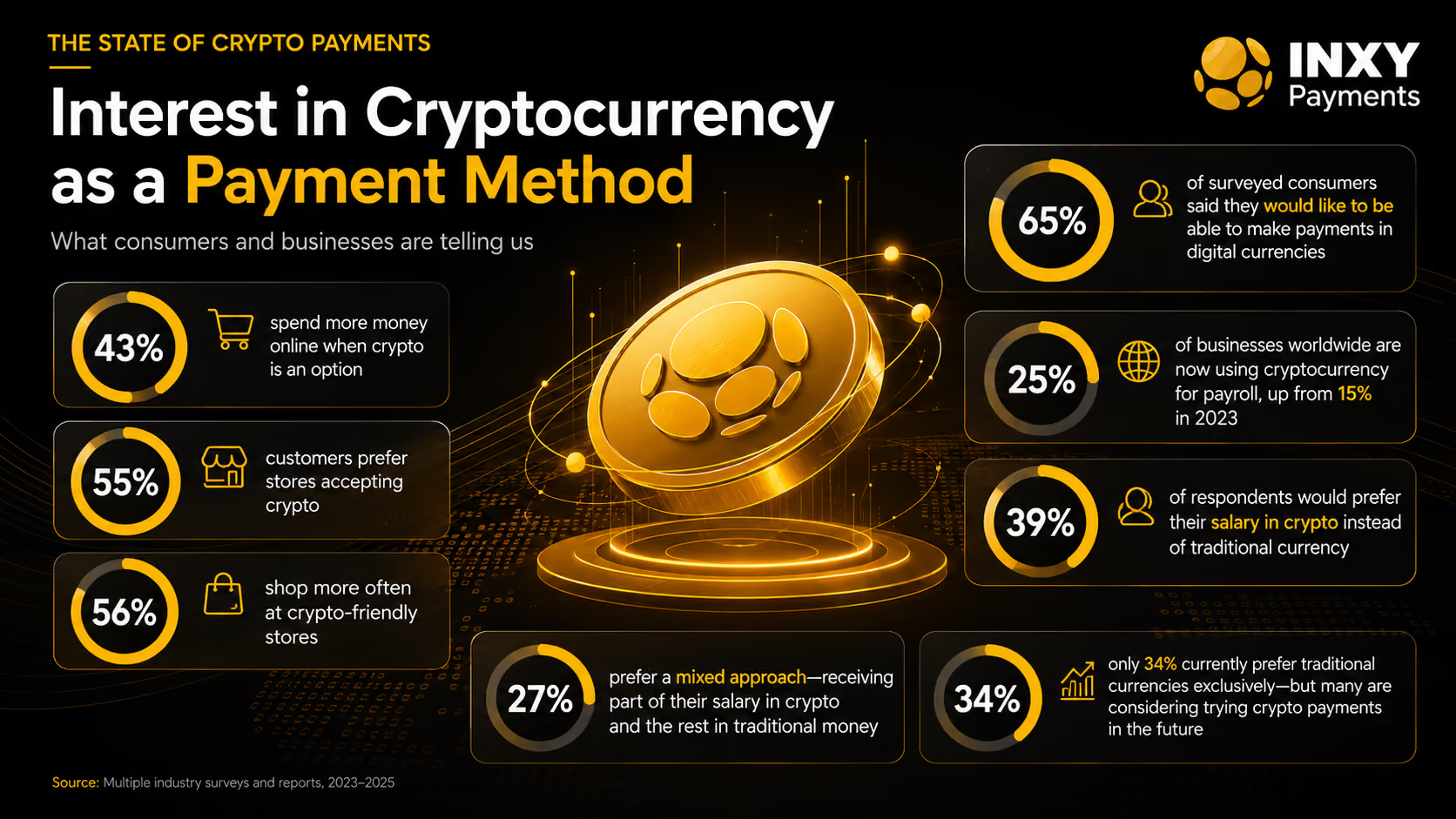
Higher lifetime value. Industry data shows crypto buyers spend roughly 2x more than traditional users, and around 43% spend more simply because crypto is offered as an option.
A buyer base that wants annual. About 60% of crypto users prefer to pay upfront for 12–36 month plans, versus only 20% of credit-card users — so offering crypto and annual pricing together is a natural fit.
With more than 824 million people globally owning crypto — over 10% of the world's population — the segment that prefers upfront, borderless payment is large and high-value, not niche.
Why Crypto Makes Annual Billing Easy to Sell
Blockchain payments are push-based and final — one confirmed transfer, no scheduled pulls. That property, which makes crypto awkward for monthly auto-billing, is exactly what you want for an annual upfront plan: a single, irreversible settlement that closes the deal.
Predictable Revenue Through Auto-Conversion
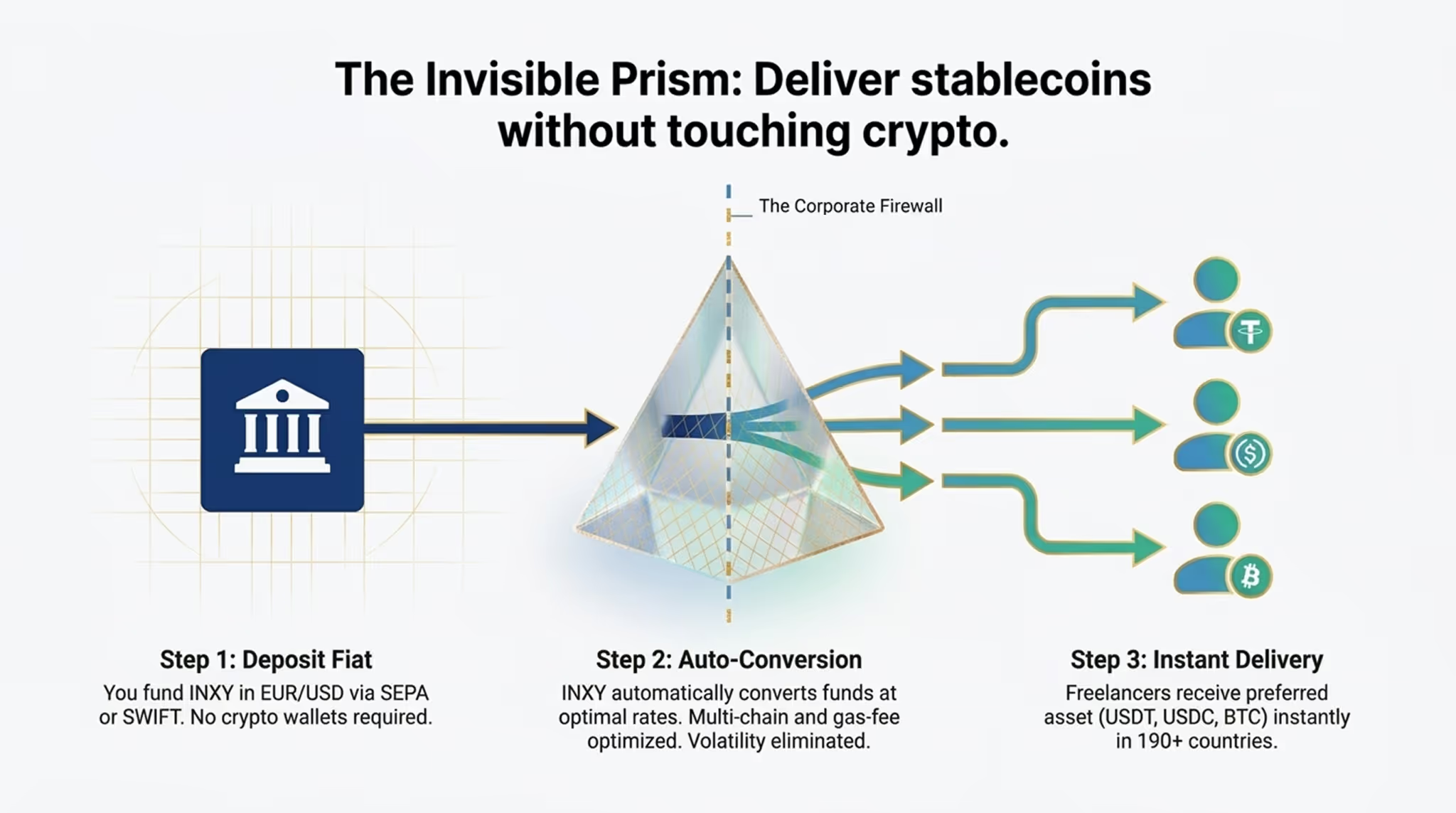
The usual objection — volatility — is solved at the gateway. When a client pays an annual license in a volatile asset, an auto-convert engine instantly settles it into stablecoins (USDT/USDC) or fiat (EUR/USD), so you book exact, predictable revenue. Stablecoins themselves are pegged 1:1 to the dollar, keeping SaaS payment management clean and auditable.
No Chargebacks, Global Reach, Instant Settlement
Zero chargebacks. On-chain payments are irreversible, eliminating friendly fraud and dispute fees on digital goods.
Borderless billing. A single settlement layer reaches customers who lack the international cards your checkout depends on, with no per-currency FX overhead.
Minutes, not days. Stablecoin payments settle in minutes instead of the 3–5 business days an international wire takes to clear.
Lower processing cost. Versus the typical 2.9% + $0.30 card fee plus cross-border markups, stablecoin transfers on networks like TRON (TRC-20) and Polygon cost a fraction of a percent.
How to Structure Annual Crypto Billing for Your SaaS
Adopting upfront annual crypto billing is a pricing-and-integration exercise, not a blockchain project:
Lead with discounted annual pricing. Make the annual plan the headline option and price the upfront discount so the cash-flow gain outweighs it.
Add crypto as a checkout option, not a replacement. Offer “Pay with Crypto” alongside fiat so you capture the high-LTV segment without disrupting existing customers.
Default to stablecoins on low-fee networks. Present USDT and USDC on TRC-20 and Polygon to keep customer-side network fees negligible and value stable.
Integrate via API or plugins, not smart contracts. Use a gateway's REST API or ready-made modules — including a native WHMCS module for hosting, cloud, and agency billing — to issue invoices and confirm payment automatically.
Auto-convert and reconcile. Convert incoming payments to stablecoins or fiat at the point of sale, and use transaction hashes plus CSV exports so finance can match every annual payment to an account.
Compliance and Accounting
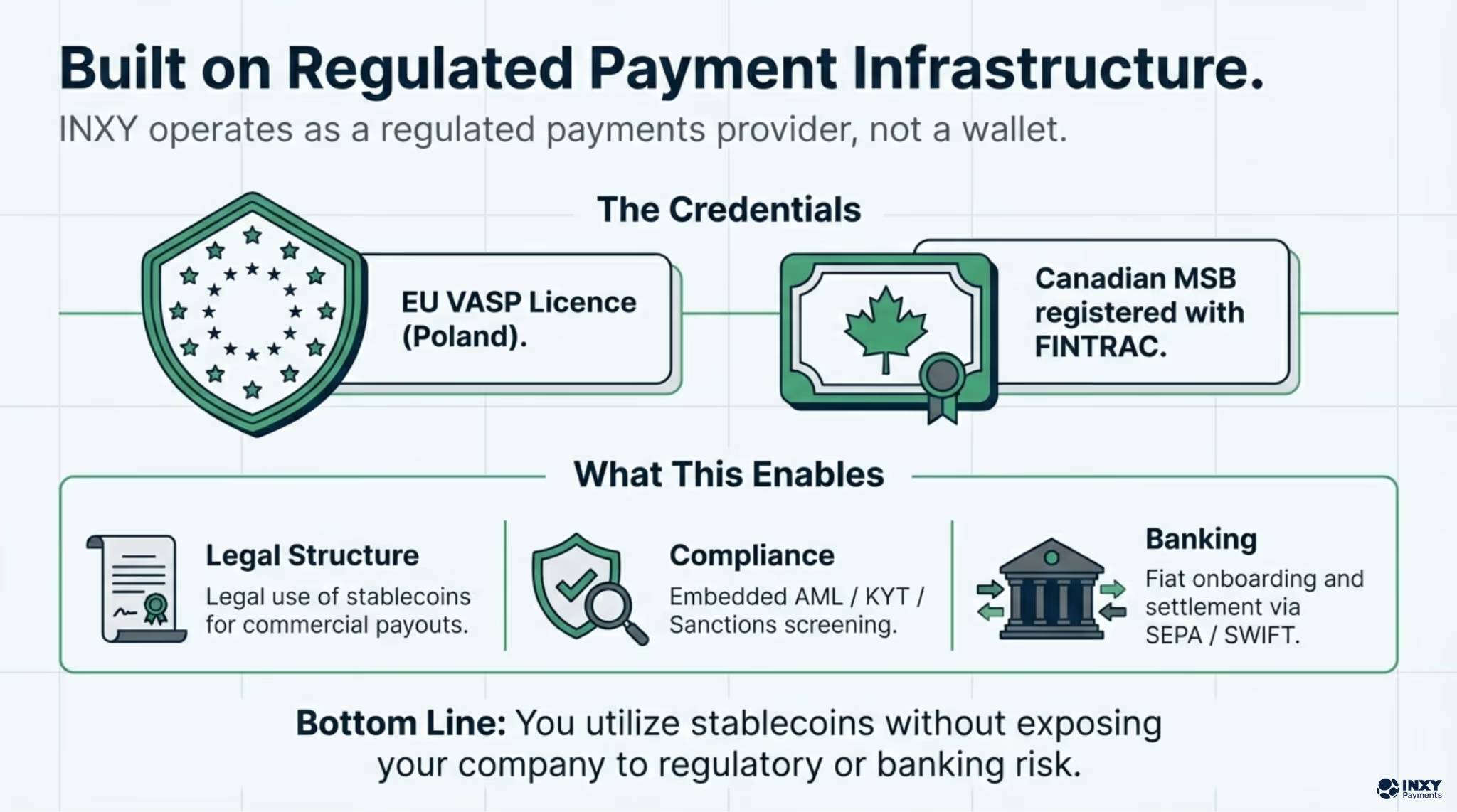
Choosing a regulated gateway keeps annual crypto billing inside the regulatory perimeter rather than outside it. The essentials are KYC/AML on counterparties, transaction monitoring, and jurisdiction-aware handling — for example the EU's MiCA framework, which favors transparent, fully-backed stablecoins like USDC. Because stablecoins are dollar-pegged and settlements can auto-convert to fiat, your revenue stays denominated in a unit your accountants already use, with detailed reporting and exports for clean books.
How INXY Supports Annual Crypto Billing for SaaS
INXY is a regulated, enterprise-grade crypto payment gateway engineered for B2B and SaaS billing. Rather than forcing crypto into a monthly auto-billing mold, it leans into what the rail does best — high-value, upfront settlement:
Built for upfront cash flow. INXY deliberately bypasses standard auto-billing, making annual tariff plans the most profitable option for high-ticket B2B software — you receive the full yearly value immediately.
Auto-Convert Engine. Incoming payments in volatile assets convert instantly to stablecoins or fiat, so a $1,000 or $10,000 annual license books as predictable revenue.
Native SaaS integrations. Robust APIs and ready-made plugins, including a native WHMCS module tailored for hosting, cloud services, and digital agencies.
Zero chargebacks and built-in mass payouts. Irreversible settlement protects revenue, while CSV- or API-driven payouts handle affiliate and contractor disbursements.
A compliance-first stack. EU VASP (Poland), Canadian MSB, MiCA readiness, AML/KYT/KYC, and audit-friendly fiat reporting.
Does crypto support automatic monthly subscriptions?
Crypto payments are push-based, so they are not built for monthly card-style auto-charges. That is why the model that works best for B2B SaaS is annual upfront billing — a single, final payment that also improves cash flow.
How do we avoid volatility on a large annual payment?
A gateway with an auto-convert engine settles incoming crypto into stablecoins or fiat at the point of sale, so a five-figure annual license is booked at an exact, predictable value.
Will offering crypto cannibalize our fiat plans?
No — it is an additional checkout option. It tends to attract new, higher-LTV customers rather than shift existing ones, since a large share of crypto buyers are new to the merchant.
How hard is integration?
You connect a REST API or use ready-made plugins such as a native WHMCS module, rather than writing smart contracts. Most teams launch faster than opening a traditional merchant account.
Conclusion
Monthly card billing spreads SaaS revenue thin and re-exposes it to failed payments and chargebacks twelve times a year. Annual upfront billing — settled in crypto — flips that: a full year of cash collected now, one renewal decision instead of twelve, no chargebacks, and a high-LTV buyer base that prefers to pay this way. The rail's push-based finality is a feature here, not a limitation.
Ready to add upfront annual crypto billing to your checkout? See how INXY can power it at inxy.io.
How to Automate Mass Crypto Payouts for International Freelancers
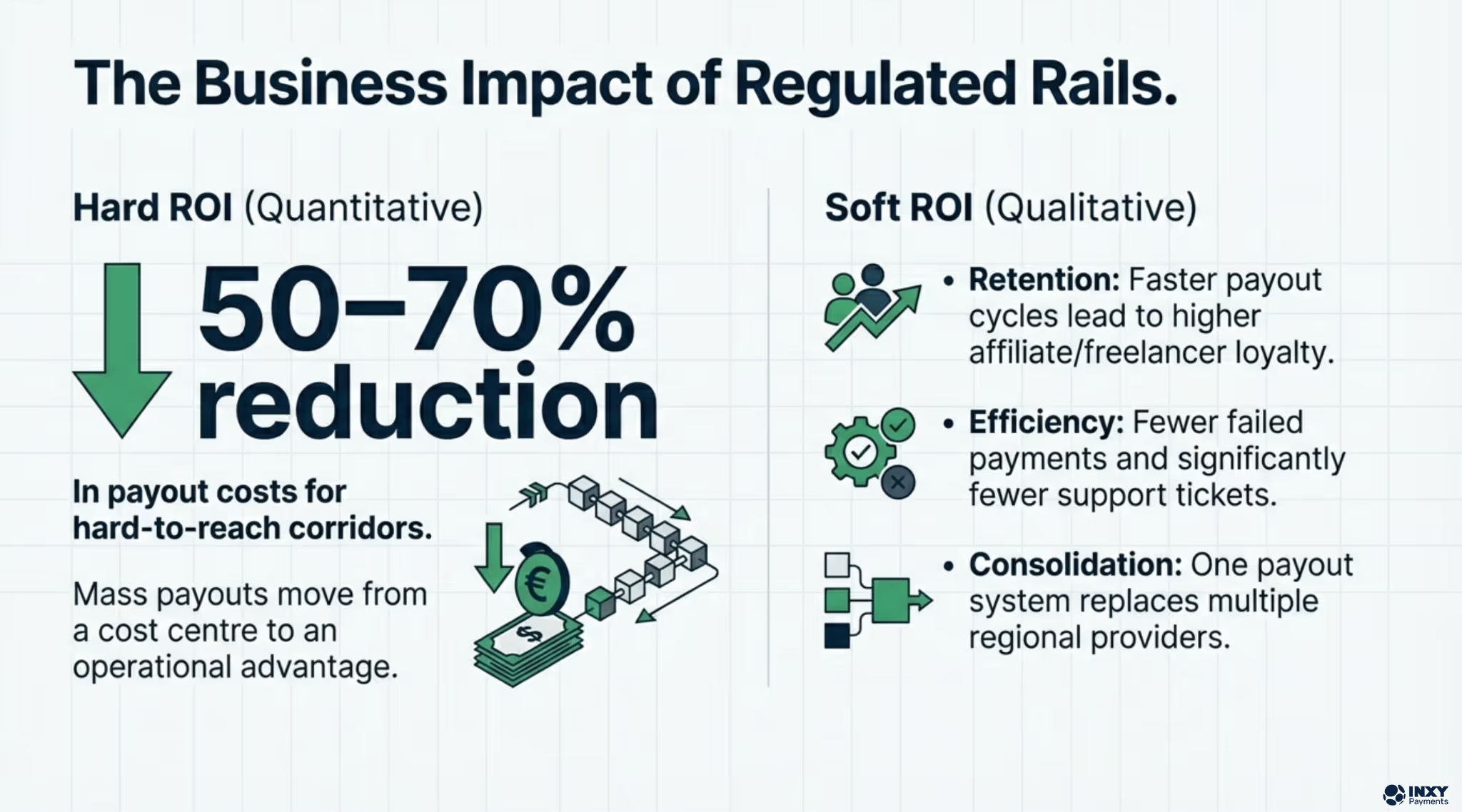
Wire transfers are draining freelance platform margins with high fees, opaque FX spreads, and week-long settlement delays. Automated mass crypto payouts via stablecoins like USDT and USDC eliminate these bottlenecks — processing thousands of global transactions in seconds through a single API call. This guide walks through the full transition: choosing the right digital assets, integrating a payout API, and automating reconciliation at scale.
How to Automate Mass Crypto Payouts for International Freelancers
It is payday, and your finance department is drowning in a massive spreadsheet filled with SWIFT codes, routing numbers, and fluctuating exchange rates. A few days later, your support channels are flooded with frustrated messages from international developers who still have not received their money because a correspondent bank mysteriously held the funds. If you operate a global freelance platform, a talent marketplace, or a remote agency, this logistical nightmare is likely your recurring reality. While hiring elite talent across borders is frictionless, compensating them remains stuck in the 1990s.
Legacy banking rails actively erode your profit margins with exorbitant fees and damage your reputation among top professionals. It is time to stop burning cash and developer hours on slow wire transfers. By transitioning to automated mass cryptocurrency payouts – specifically leveraging stablecoins you can execute thousands of global transactions simultaneously, settling payments in seconds rather than unpredictable weeks.
The Bottleneck of Traditional Global Payroll
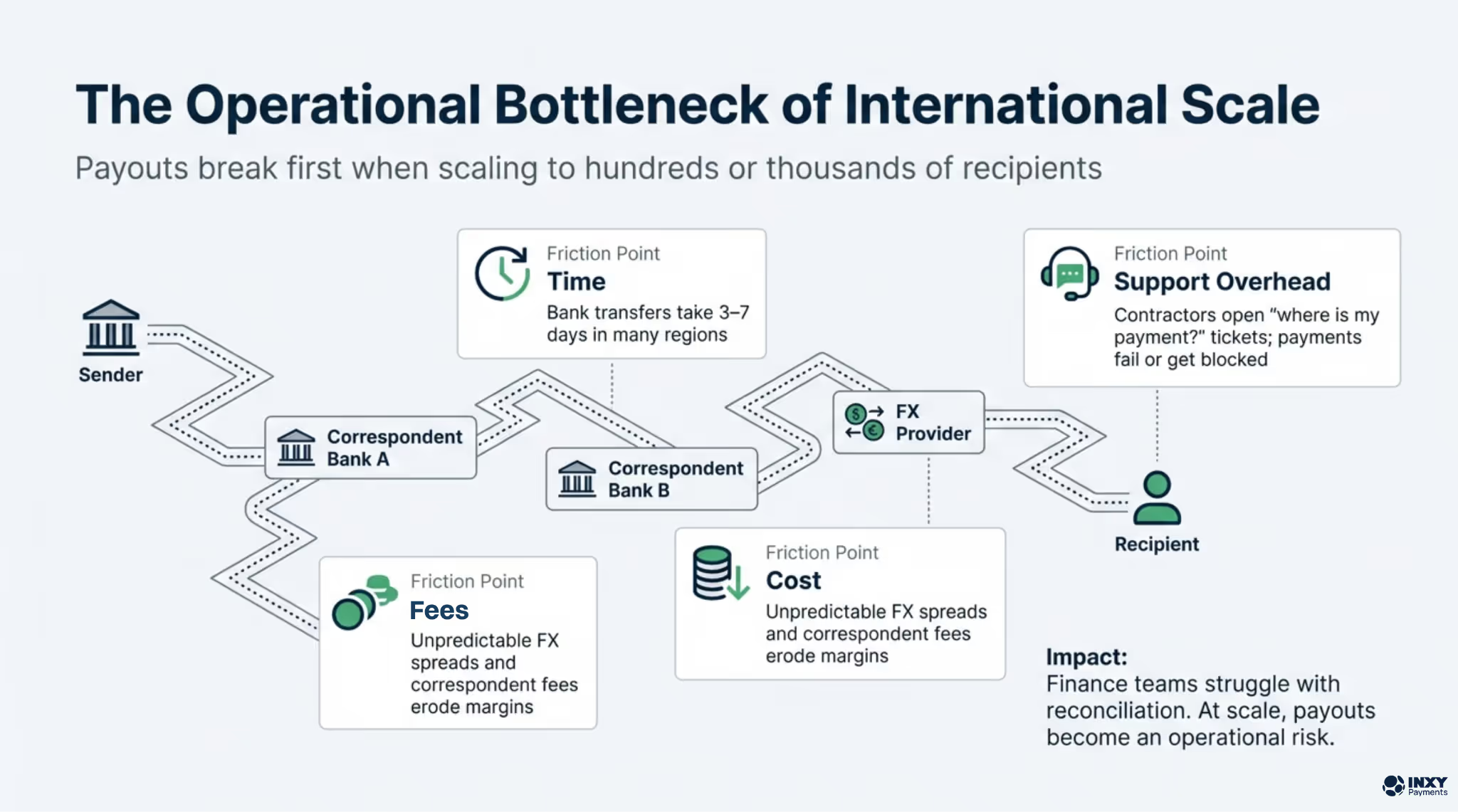
Processing international payroll through fiat channels involves a convoluted chain of intermediary banks, each extracting a cut and adding days to the settlement timeline. The traditional system is plagued by critical operational pain points for freelance platforms:
Exorbitant Transaction Fees: Standard wire transfers cost $15 to $50 per transaction. This makes frequent micro-payouts to temporary contractors or gig workers entirely unfeasible.
Unpredictable Settlement Delays: Cross-border payments routinely take three to seven business days to clear, causing immense anxiety for freelancers relying on timely income.
Hidden FX Markups: Banks apply highly unfavorable foreign exchange spreads, directly reducing the contractor's purchasing power and causing disputes over missing funds.
Severe Financial Exclusion: Talented professionals in emerging markets are often completely locked out of standard, legacy payment methods like PayPal or Stripe.
The Mechanics of Crypto Payout Automation
Shifting platform operations to cryptocurrency, particularly utilizing stablecoins like USDT or USDC, neutralizes these flaws. Because they are securely pegged to the US Dollar, they eliminate the price volatility of digital assets like Bitcoin.
The true transformative power for your platform lies in API automation. Instead of a finance manager manually processing invoices one by one, a mass payout system allows your backend infrastructure to trigger hundreds of transactions simultaneously through a single API call. Executed via automated batch processing on high-speed blockchains like Tron or Polygon, network fees drop to mere pennies.
Step-by-Step Guide to Automating Global Payouts (тут нужна помощь Артем в правильности шагов)
Transitioning to a crypto-first compensation model requires a strategic technical approach to ensure smooth onboarding for your contractors:
Select the Right Digital Assets: Default to stablecoins (USDT/USDC) on fast networks to ensure negligible gas fees and zero price volatility for the receiving party.
Integrate a Payout API: Connect your backend directly to a dedicated crypto gateway supporting mass payout endpoints instead of trying to build and maintain complex nodes from scratch.
Map Contractor Wallets: Update your platform onboarding flow to allow freelancers to securely save and verify their digital wallet addresses alongside their traditional profile data.
Automate Trigger Events: Configure your platform's internal logic so that approved timesheets, completed milestones, or specific calendar dates automatically trigger the API payout calls.
Streamline Reconciliation: Utilize a gateway that provides detailed transaction hashes and automated ledger updates so your accounting team can track successful disbursements in real-time.
INXY: The Premier Payout Gateway for Freelance Platforms
Implementing automated financial infrastructure requires an enterprise-grade technological backbone. For global talent marketplaces, remote agencies, and HR platforms modernizing their compensation systems, INXY stands out as the ultimate strategic partner.
INXY provides a powerful cryptocurrency payment gateway designed specifically for the high-volume, automated disbursement needs of the gig economy. By integrating the INXY API, your platform can automate mass crypto payroll effortlessly, completely removing the heavy lifting of blockchain node management. We act as the secure bridge between your administrative dashboard and the blockchain, ensuring rapid global settlement, automated transaction reconciliation, and flawless execution for every single contractor payout. Our infrastructure scales perfectly alongside your growing international workforce.
Conclusion
The future of global work is undeniably decentralized, and platform compensation methods must evolve to keep pace. Automating mass crypto payouts is not just an operational upgrade; it is a profound competitive advantage that attracts and retains top global talent who demand fast, transparent payments. Do not let outdated banking rails hold your platform's growth hostage.
Ready to revolutionize your payroll system and automate your global disbursements? Discover how our robust API solutions can scale your platform securely by visiting https://www.inxy.io/ today.
Industry insiders call it "death by a thousand cuts." Whether it's inflated spreads or high withdrawal fees, processing digital assets can be surprisingly expensive if you're using the wrong tools.
In our latest guide, we break down: The Anatomy of Fees: Maker vs. Taker and the "Silent Cost" of spreads. Top Retail Exchanges: Where to find the lowest rates for day trading. The Business Trap: Why using a retail exchange for merchant payments is a costly mistake. For enterprises, the secret to cost-efficiency isn't a cheaper exchange—it's specialized infrastructure. Learn how INXY eliminates volatility risks and provides transparent, flat-rate processing.
5 min read
27.04.2026
Imagine closing a $100,000 international deal or executing a perfectly timed crypto trade, only to discover that thousands of dollars vanished into thin air before the funds even settled. The money wasn't stolen by hackers, nor was it lost to a sudden market crash. It was silently siphoned off by the very platform you trusted to process it.
This is the reality of hidden cryptocurrency fees—a silent killer often described by industry insiders as "death by a thousand cuts." Whether you are an active trader watching your portfolio bleed or a business owner seeing profit margins shrink, ignoring the complex fee structures of digital asset platforms is an expensive mistake. Finding the cheapest crypto exchange is not just about clicking the marketing banner that screams "0% trading fees"—it requires a deep understanding of how these platforms actually generate their revenue behind the scenes. In this guide, we will uncover the true costs of digital transactions, highlight the platforms offering the best rates, and reveal why modern businesses must use an entirely different infrastructure to protect their bottom line.
The Anatomy of Cryptocurrency Fees
To navigate the market effectively and keep more of your own money, you first need to understand the different tolls you pay along the way. Most users only look at the baseline trading fee, but the reality is much more complex:
Maker and Taker Fees: This is the most common and transparent pricing model. A "Maker" provides liquidity to the market by placing a limit order that isn't immediately filled. A "Taker" removes liquidity by executing a market order against the existing order book. Because exchanges desperately want deep, active order books, Maker fees are almost always significantly cheaper than Taker fees.
The Spread (The Silent Cost): This is the hidden difference between the highest price a buyer is willing to pay and the lowest price a seller is willing to accept. Platforms that aggressively advertise "zero fee trading" almost always make their money by inflating this spread. This means you are essentially getting a much worse exchange rate than the actual global market price.
Deposit and Withdrawal Fees: Getting your money onto an exchange might be free, but taking it off rarely is. Depending on network congestion and the exchange's internal corporate policies, moving your Bitcoin or USDT to a private wallet or a bank account can carry shockingly high flat fees, completely negating any money you saved on trades.
Top Contenders: Where Retail Traders Pay Less
If you are an individual investor or a day trader, choosing the right platform can save you thousands of dollars over a year of active trading. While fee structures frequently evolve, a few industry giants consistently offer the most competitive rates:
Binance: Globally recognized as the heavyweight champion of low fees. With baseline spot trading fees often starting around 0.1% (and dropping even lower if you hold their native BNB token), it remains the premier destination for high-volume traders seeking maximum cost-efficiency.
Kraken (Pro): While Kraken's standard application is highly user-friendly, switching to the Kraken Pro interface unlocks heavily discounted maker and taker fees. It is widely praised for its strict transparency, meaning traders won't be blindsided by unexpected spread inflations during highly volatile market swings.
KuCoin: Often hailed as the "people's exchange," KuCoin maintains a highly competitive baseline fee structure. It is particularly popular for investors dealing in micro-cap altcoins who want to maximize their purchasing power without being drained by high transactional costs.
The Business Trap: Why Cheap Exchanges Are Expensive for Merchants
Here is where the narrative sharply pivots. If you are an individual trading for personal profit, the exchanges listed above are perfect. But what if you are a business owner? What if you run an e-commerce store, a digital agency, or an international SaaS company, and you want to accept crypto payments from your clients?
Many businesses make the fatal mistake of directing customer payments directly into a standard retail exchange account. They assume that because the trading fees are low, it must be a cost-effective collection solution. In reality, it is a logistical and financial nightmare. When a business uses a retail exchange to process payments, they face a costly "Triple Threat":
Customers are forced to pay unpredictable network gas fees just to send funds to your specific exchange wallet.
The business faces severe volatility risks between the time the customer pays and the time the company manually logs in to convert the crypto to stable fiat.
The company is eventually crushed by high, flat-rate withdrawal fees when attempting to move that accumulated revenue into a corporate bank account.
The Cost-Effective Enterprise Solution
To truly minimize fees and maximize corporate revenue, modern businesses do not use speculative trading exchanges to accept payments. Instead, they rely on specialized, enterprise-grade infrastructure: a dedicated crypto payment gateway like INXY PAYMENTS.
Engineered explicitly for B2B and merchant needs, INXY completely bypasses the predatory spread structures and withdrawal traps of retail exchanges. By integrating INXY into your business framework, you unlock a fundamentally superior economic model:
Transparent Processing Rates: Unlike exchanges that hide exorbitant costs in the spread, a premium gateway like inxy.io offers flat, highly transparent processing fees. You know exactly what it costs to process a payment, allowing for accurate, predictable financial forecasting.
Instant Conversion, Zero Volatility: To avoid the hidden, devastating cost of a sudden market crash, the gateway can instantly convert incoming crypto payments into stablecoins or fiat currency at the exact point of sale.
Automated Accounting: Time is money. Instead of paying accountants to manually track individual wallet deposits across a retail exchange, INXY provides automated invoicing, robust reporting, and mass payout features, drastically reducing expensive administrative overhead.
Conclusion
Navigating the complex world of cryptocurrency fees requires looking past bold marketing slogans and understanding the actual mechanics of the platform. For individual investors, optimizing maker and taker fees on retail platforms is the key to maximizing portfolio returns. However, the corporate world requires a drastically different toolset. By shifting away from retail exchanges and leveraging a powerful crypto payment gateway like INXY, forward-thinking businesses can process global payments with minimal friction, absolute transparency, and unparalleled cost-efficiency.